Introducing Fact Libraries: the receipts behind every claim your marketing makes
Warrant TeamToday we're launching Fact Libraries in Warrant OS. It's one auditable home for the facts and files your marketing claims depend on, connected to every file that uses them. As far as we can tell, no other marketing compliance platform does this.
Here's why we built it.
The ad didn't change. The facts did.
In September 2024, the SEC fined 9 investment advisers a combined $1.24 million over their marketing. Nothing dramatic. Ratings more than 5 years old, shown with no date. An award to a firm principal that nobody could back up. And our personal favorite: an ad claiming membership in an organization that didn't exist.
Nobody needed a new rule to catch any of that. They needed the receipts.
Now picture your rate committee on a Tuesday. The 12-month certificate drops from 4.25% to 3.90%. The rate sheet is updated by lunch. Meanwhile the branch poster, the email nurture, the landing page someone duplicated in March and the PDF a loan officer keeps sending all still say 4.25%. Nobody did anything wrong. Nobody knows where the old number lives, either.
Same shape, both times. The claim was true the day it was approved. Then the facts moved, and the marketing didn't. And regulators don't grade on the approval date. The SEC Marketing Rule, Reg DD, UDAAP and the FTC all care about what your ad says today.
That's where marketing compliance breaks now. Not in review. After it.
What Fact Libraries do
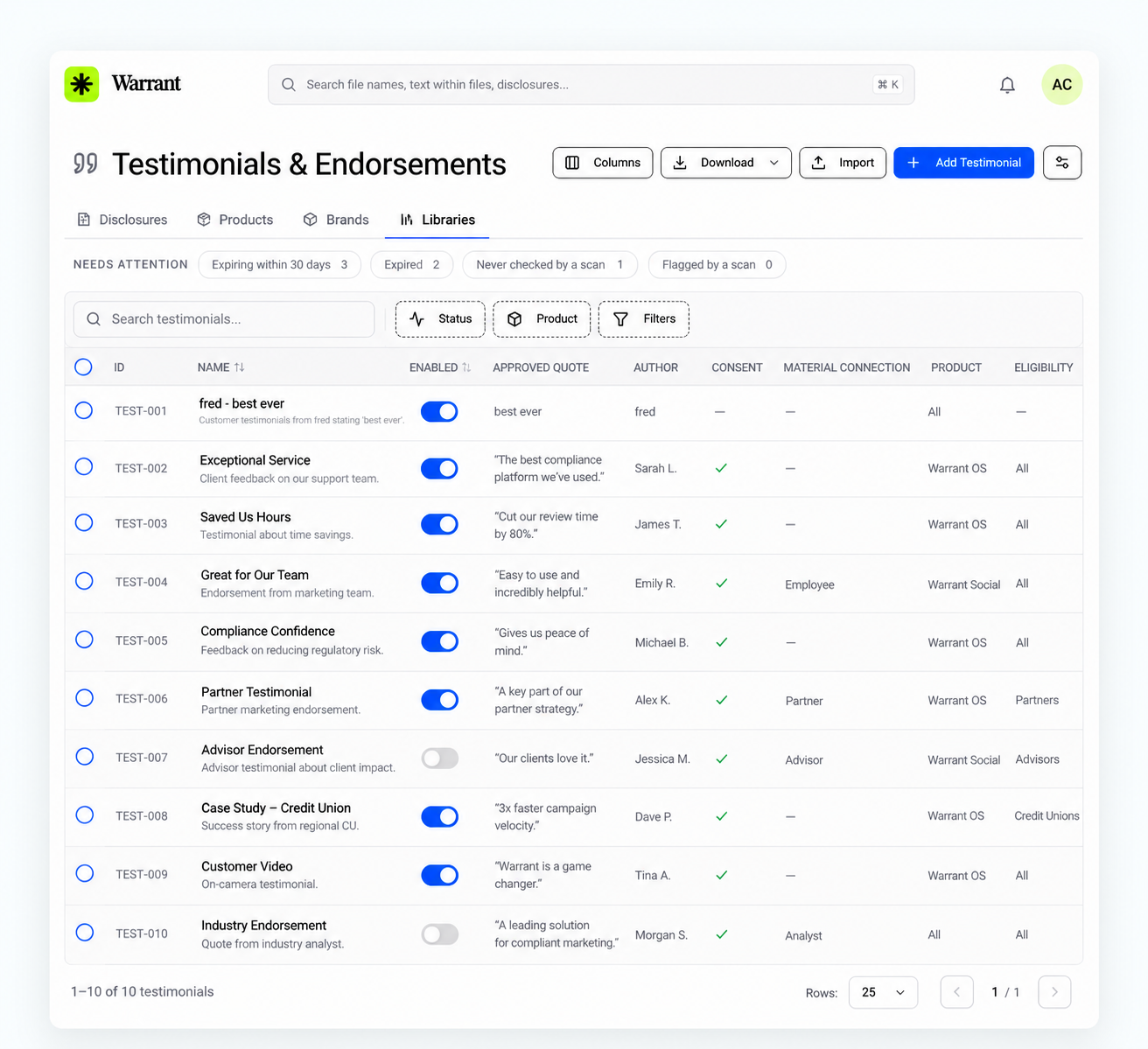
Most compliance tools check an file against rules. Fact Libraries check it against your facts.
Bring what you already keep. Rate sheets, promotions, testimonial consents, award letters, studies, partner brand guidelines. Upload the spreadsheet or file and map it once. (Yes, master_rates_FINAL_v7.xlsx counts. We've seen worse.)
Check every file against the source. When an file goes through review, Warrant compares its claims to your libraries. No record, it gets flagged. Wrong number, it gets flagged with the record it should match.
Keep the proof with the file. Every claim that checks out is linked to its source, so the substantiation lives with the file, not in someone's inbox.
See everything a change touches. Every record knows which file use it. Update the record and the stale file surface on their own.
Policies are the walls. Fact Libraries are what changes inside them.
One source of truth, from draft to version 18
Fact Libraries are the newest piece of a bigger idea: Warrant as the single source of truth for regulated marketing.
Every file in Warrant already carries its whole life story. The first draft. Every comment from legal. Every redline from compliance. Every approval, and who gave it. Version 18, the one that actually went live. All of it in one immutable audit trail, not scattered across email threads and a folder called "FINAL_approved_v3."
Fact Libraries add the piece that was missing. Now the trail shows which rate, award or study each claim relied on at every version, from draft 1 to version 18, and whether it's still true today.
So when an examiner asks why a flyer said 4.25% in May, you don't rebuild the answer from your inbox. You open the file, see the version that ran, and see the rate record it relied on, the reviewer who approved it and the day the rate changed.
5 ways teams are using them
Rates. Load your rate sheet: product, APY or APR, term, effective date. When a rate moves, upload the new sheet and every file still citing the old one gets flagged. Reg DD expects an advertised APY to carry the date it was accurate as of; the library keeps that date attached to the number.
Promotions. Sweepstakes, bonuses, Skip-A-Pay and limited-time rates all come with start dates, end dates and rules. When the sweepstakes ends, you see every page still taking entries.
Testimonials. Track who said it, the consent and what it covers. When a consent lapses, every file using that quote surfaces before it becomes an FTC Endorsement Guides problem.
Awards. Each award or rating gets its source, year and expiration. "Best rate in the state" gets checked against a real award from this year, and the proof is one click away. Warrant already flags superlatives as claims that need substantiation; now the reviewer sees the substantiation right next to them.
Partner brand guidelines. Co-brand rules, logos and required language live with the partner record. When the agreement renews and the rules change, you see every file that needs another look.
Why nobody else does this
Most review tools treat approval as the finish line. A file goes in, someone signs off, and the record shows what was true that day.
That's a snapshot. Warrant keeps the whole history, and Fact Libraries tie it to a live connection between the claim, the source behind it and every file that uses it. Approval is where tracking starts, not where it stops.
Getting started
Pick the spreadsheet that gives your team the most anxiety. For most teams it's the rate sheet or the testimonials spreadsheet.
Upload it to Libraries in the Brand Portal and map the columns once.
Run your live files through review. You'll see which ones cite each record, and which ones are already out of date. (Brace yourself a little.)
Fact Libraries are live in Warrant OS today with file and CSV upload, included in platform pricing. Direct connections to SharePoint, Excel and ServiceNow are on the roadmap so your libraries stay in sync without re-uploading.
We're getting marketers out of the sheets, Excel and Google Sheets alike. If your team has a master_rates_FINAL_v7.xlsx, we'd love to see it. Book a demo and bring the spreadsheet.
FAQ
What is a Fact Library? A library in Warrant OS that holds the facts and files marketing claims depend on, like rates, promotions, testimonials, awards and partner brand rules, connected to every asset that uses them.
How is it different from a disclosure library? Disclosures are required copy. Fact Libraries hold the facts inside that copy and the proof behind your claims.
What happens when a rate or award changes? Update the record and Warrant flags every asset that still uses the old version.
Does it sync with SharePoint or Excel? Yes. Update it by uploading an excel or providing a link (SharePoint, Google Sheets, etc.).